
Clean your email list. Save your sender reputation.
Pay-as-you-go email verification for newsletters and small businesses. Upload a CSV and we tell you which addresses are real, which are risky, and which will bounce. We email you when it's ready.
No signup. We never store the addresses you paste here.
Works with the senders you already use


Three steps. No setup.
You don't need to be technical. If you can drag a file onto a webpage, you can use ListBouncer.
01
Drop your CSV
Any column layout works. We find the email field automatically. No setup and nothing to connect.
02
We verify every address
Live SMTP probes against each recipient's mail server. Disposable domains, role inboxes, catch-alls, and bounces all flagged.
03
Cleaner list, ready to download
We email you when it's done. Your list gets a health grade, and you download a clean file ready for MailPoet, Mailchimp or Klaviyo. Send with confidence.

More than a pass or fail
A clean list is the start. Here's what you get every time you upload one. These are real screens from the ListBouncer dashboard.
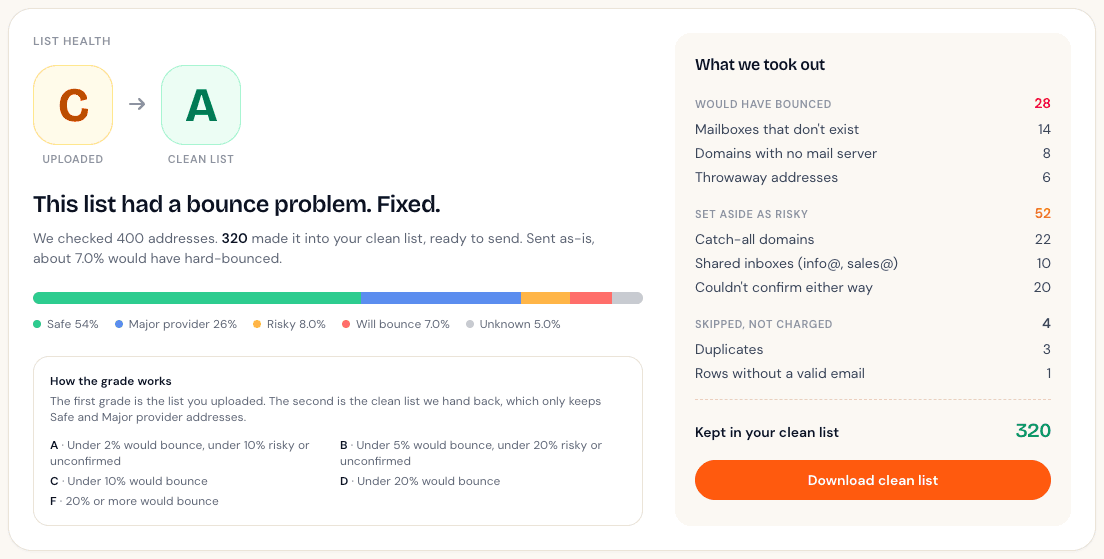
Watch a C list become an A
Every list gets two grades: the one you uploaded and the clean one we hand back. Then a plain receipt shows exactly what we took out and why, from dead mailboxes to throwaway addresses. Duplicates are skipped, and you're never charged for them.
- ✓Before and after grade on every list
- ✓A line-by-line receipt of what was removed
- ✓A reason for every address
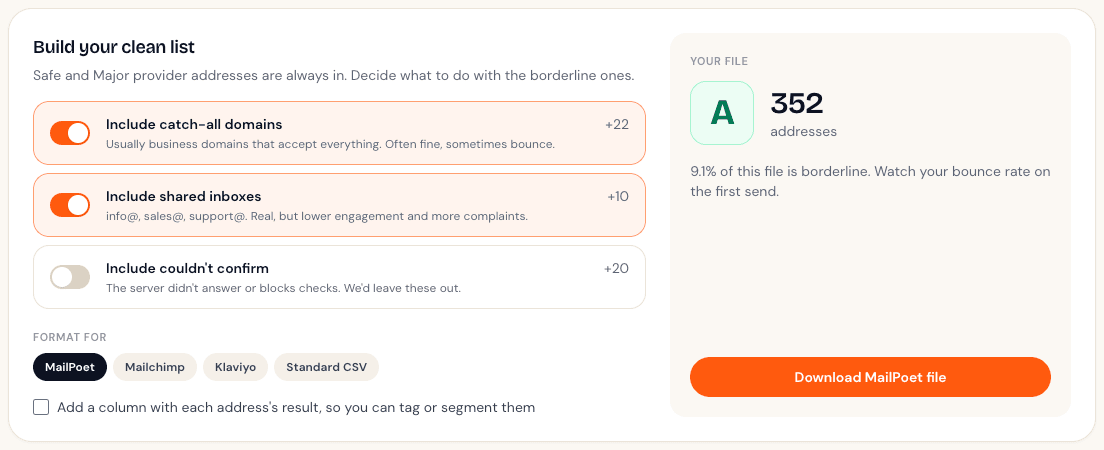
You decide what stays
Some addresses are a judgment call. Flip a switch to keep catch-all domains or shared inboxes, and watch the grade of your file update live. Then download it ready to import into MailPoet, Mailchimp or Klaviyo.
- ✓Keep or drop each kind of borderline address
- ✓Files formatted for MailPoet, Mailchimp and Klaviyo
- ✓Optional result column for tagging and segments
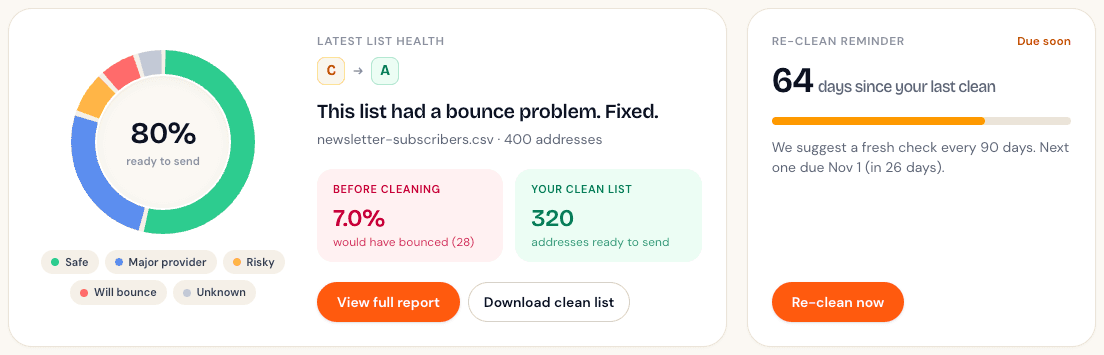
We'll tell you when it's time again
People change jobs and abandon inboxes, so a clean list slowly fills back up with bounces. Your dashboard counts the days since your last clean, and we'll send you one friendly email when a list is due for a fresh check.
- ✓Days-since-clean tracker on your dashboard
- ✓One reminder email per list, easy to switch off
- ✓Your latest list's health at a glance
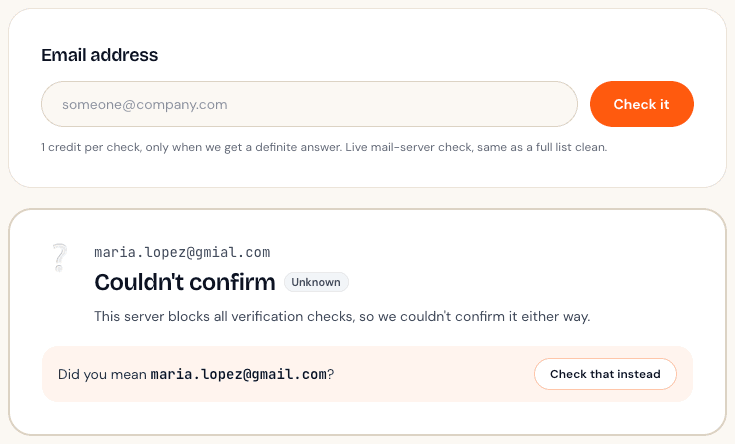
Catch the typo before it bounces
Paste a single address for a live check in seconds. If someone typed gmial.com, we'll suggest the fix.
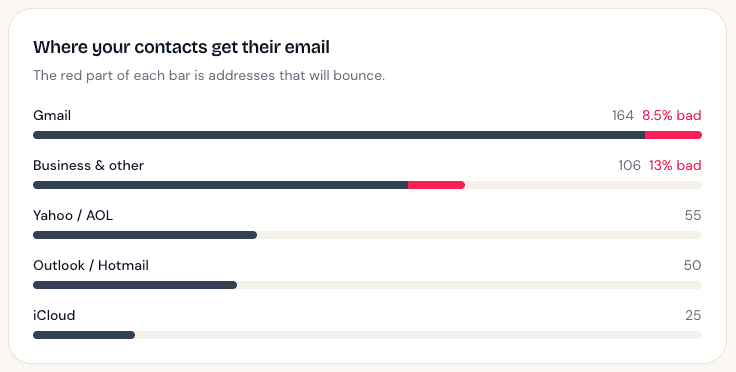
See where the bad addresses are
Find out how your contacts split across Gmail, Outlook, Yahoo and business domains, and which group is carrying the bounces.
No card required.
Others check.
We look after your list.
Most cleaners hand you a spreadsheet and leave. We grade your list before and after, show you exactly what we took out and why, and remind you when it's time to clean again. Our bouncer keeps it simple.

The house rules
Pay once. Your credits never expire.
ElsewhereMonthly subscriptions and enterprise upsells
We tell you when your list needs cleaning again.
ElsewhereYou find out when the bounces start
Yahoo, Outlook and AOL get their own bucket.
ElsewhereMarked invalid by mistake, or lost in ‘unknown’
You choose what goes in your clean list.
ElsewhereOne combined export you have to sort out yourself
We never store the file you upload.
ElsewhereUploads kept around for analytics or support
- No data resaleWe never sell or share your addresses
- Delete on demandWipe reports and addresses anytime
- 256-bit TLSEncrypted in transit
- No file storageYour CSV is processed in memory, never written to disk
Whatever your sending looks like
Newsletter, outreach, lifecycle, re-engagement. The cost of a dirty list is the same.
- Newsletter senders
Protect your sender reputation
Too many bounces and mailbox providers start sending you to spam, or stop delivering at all. Clean before you send.
- Cold outreach
Stop wasting send credits
Every bounced address you send to is a wasted credit on your outreach tool. Verify first, save money.
- Lead gen ops
Trust the leads you pass on
Hand sales a list where every address actually exists. Fewer rep complaints, higher conversion.
- Re-engagement
Clean before you reactivate
Old lists go stale as people change jobs and abandon inboxes. Verify before you re-engage so dead addresses don't hurt your domain.
Pay once. No subscription.
Pick the pack that matches your list size. Credits stay in your account forever. Try it free with 100 addresses, no card required.
100 addresses
Start hereIncluded on every account
No card required
FreeStart free2,000 addresses
A small newsletter
$4.50 per 1,000
$9Buy once5,000 addresses
A growing list
$3.80 per 1,000
$19Buy once10,000 addresses
Most popularMost senders land here
$3.50 per 1,000
$35Buy once25,000 addresses
Serious volume
$2.76 per 1,000
$69Buy once50,000 addresses
Agencies and big sends
$2.38 per 1,000
$119Buy once
Bigger list? Email support@listbouncer.com for custom pack pricing.
Things people ask
01How accurate is ListBouncer?+
We run live SMTP probes against each recipient's mail server, the same technique most verification services use. Accuracy is typically 96 to 99% for popular major providers like Gmail and iCloud. For providers that don't allow per-mailbox verification (such as Yahoo, Outlook, Hotmail, AOL, and most Google Workspace or Microsoft 365 domains), we layer additional logic and flag them in their own bucket so you don't get false-invalid results.
02What happens to my list after verification?+
Your uploaded CSV is processed in memory and never written to disk. The per-address verdicts are stored in your account so you can re-download them; delete a report from your dashboard and those rows are wiped too. We don't sell or share addresses. Ever.
03Why pay-once instead of a subscription?+
Most senders clean lists in bursts. Before a big send, after a long break, when re-engaging cold contacts. Subscriptions punish that pattern. Credits that never expire match how you actually work.
04Do you handle disposable and catch-all addresses?+
Yes. Disposable domains like Mailinator, Guerrilla Mail, 10minutemail and about 3,500 others are flagged from a static list before we even probe. Catch-all domains are labeled separately so you can decide whether to keep or drop them.
05Can I use ListBouncer from my own tools or an AI assistant?+
Yes. You can add ListBouncer to Claude or ChatGPT and ask it to check an address or clean a list. Developers can use the REST API with a key from the dashboard. Both use the same credits as the website.
06What if some of my addresses come back as 'unknown'?+
'Unknown' covers addresses where the mail server didn't give us a definitive answer, usually Google Workspace or Microsoft 365 domains that block per-mailbox verification. Yahoo, Outlook, Hotmail, and AOL behave similarly, so they get their own 'major provider' bucket (likely deliverable, just unverifiable). Rather than guess and risk dropping real addresses, we surface both buckets honestly. Keep them if they're from recent sign-ups, or drop them if you want to be conservative. Your call. You don't pay for Unknowns: those credits go back to your account when the clean finishes.
Ready to clean your list?
Start with 100 free addresses. No credit card, no subscription. Drop a CSV and see what comes back.
Try free with 100 addresses