
Building and downloading your clean list
Pick which groups go in your file, choose a format for MailPoet, Mailchimp or Klaviyo, and add a result column if you want one.
Updated October 7, 2026
The one-click option
On any finished report, Download clean list gives you every Safe and Major provider address. For most people, that's all you need.
Build your own
Further down the report, Build your clean list lets you choose exactly what goes in the file.
1. Pick what to include. Safe and Major provider are always in. You can add:
- Catch-all domains: company domains that accept any address.
- Shared inboxes:
info@,sales@and similar. - Mixed answers: the mail server gave an unclear reply.
- Couldn't confirm: the Unknown group. The server didn't answer or blocks checks.
The grade and address count update as you switch things on, so you can see the trade-off before downloading.
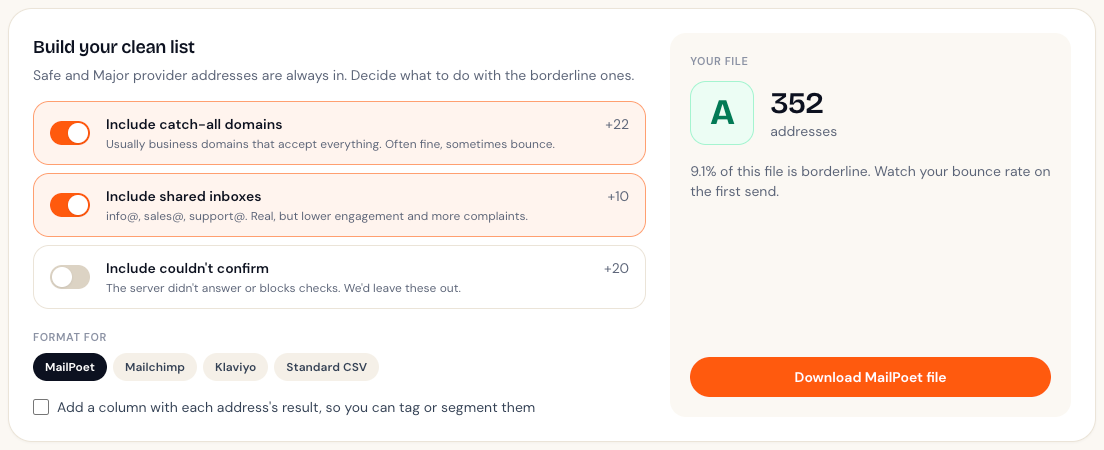
2. Pick a format. The file's column headers are set up for the tool you're importing into:
| Format | Columns |
|---|---|
| Standard CSV | first_name, last_name, email |
| MailPoet | first_name, last_name, email |
| Mailchimp | First Name, Last Name, Email Address |
| Klaviyo | First Name, Last Name, Email |
Names come from your original upload, if it had name columns.
3. Add a result column (optional). Tick it to add a listbouncer_result column, so you can see why each address is there or tag contacts in your email tool.
Downloading a single group
Each group in the results breakdown has its own Download CSV button. That's handy for grabbing just the Will bounce addresses so you can remove them from your email tool. See Removing bad addresses from your email tool.
Everything, with results
Download full report, next to the results table, gives you every address with its result. It's useful for your records or for a spreadsheet review.
Didn't answer your question?
Email support@listbouncer.com or use the contact form. A real person replies.