
Your list health grade
How we grade your list from A to F, why you see two grades, and what the projected bounce rate means.
Updated October 7, 2026
Two grades, before and after
Every report shows two grades:
- The list you uploaded. This is how healthy your list was before cleaning.
- Your clean list. This is the file we hand back, which keeps only Safe and Major provider addresses.
So D → A means your list had problems and the file you download doesn't.
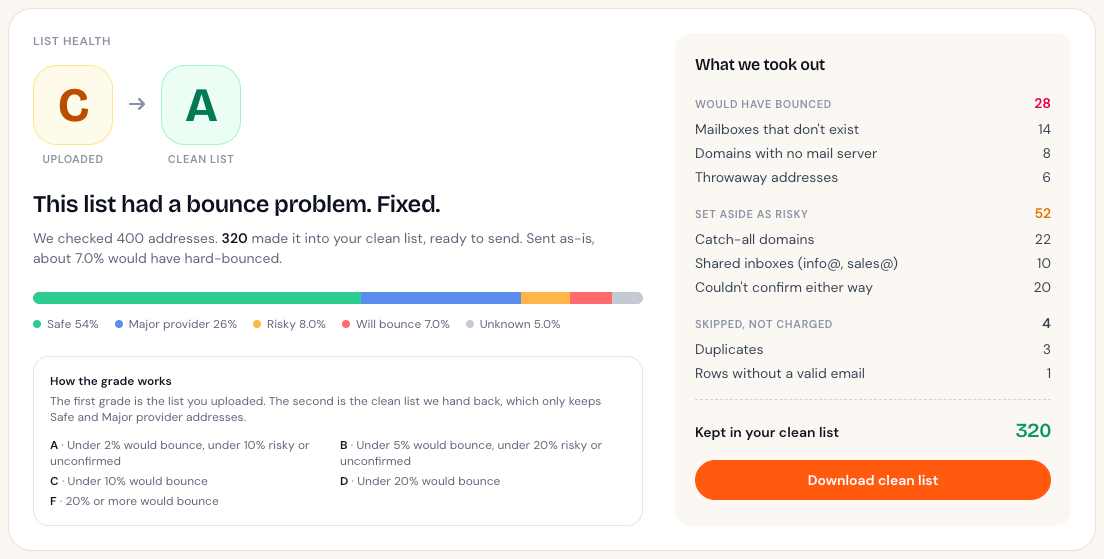
How the grade is worked out
| Grade | Rule |
|---|---|
| A | Under 2% would bounce, and under 10% risky or unconfirmed |
| B | Under 5% would bounce, and under 20% risky or unconfirmed |
| C | Under 10% would bounce |
| D | Under 20% would bounce |
| F | 20% or more would bounce |
"Would bounce" is the share of addresses in the Will bounce group. "Risky or unconfirmed" is Risky plus Unknown.
Projected bounce rate
This is the share of your uploaded list we're confident would hard-bounce if you sent to it today. Most email platforms start to worry once hard bounces go above a few percent of a send, so a high number here is worth acting on before you hit send.
Compared with last time
If you've cleaned a list before, your report also shows how this one compares with your previous clean: the grade change, the bounce rate change, and whether the list grew or shrank.
Didn't answer your question?
Email support@listbouncer.com or use the contact form. A real person replies.